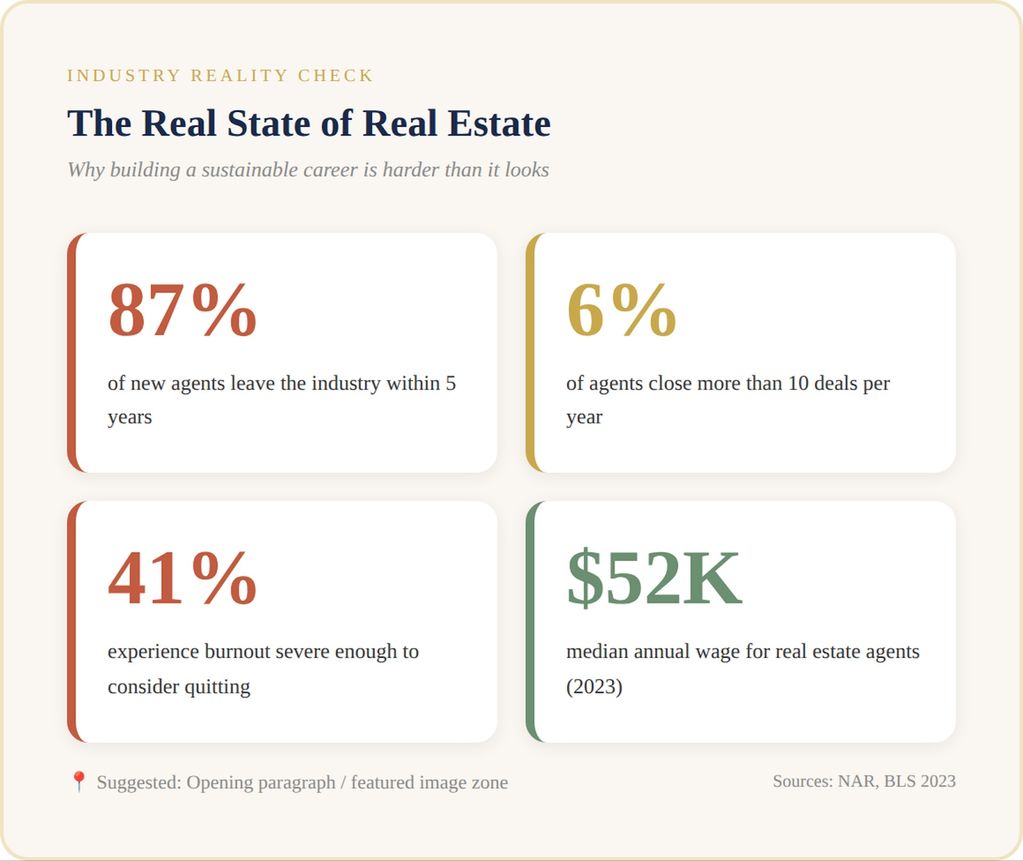
The real estate industry loses eighty-seven percent of new agents within five years. But despite steady demand, most agents are struggling with how to build a sustainable real estate career. Alison Alston Lodestone Real Estate — powered by eXp Realty in Charlotte, North Carolina — is proof that it is possible
On this episode of Why Do I Suck as a Real Estate Agent, she sat down with me to explain how patience, boundaries, and hard-won wisdom changed everything.
Who Is Alison Alston & What Makes Her Different
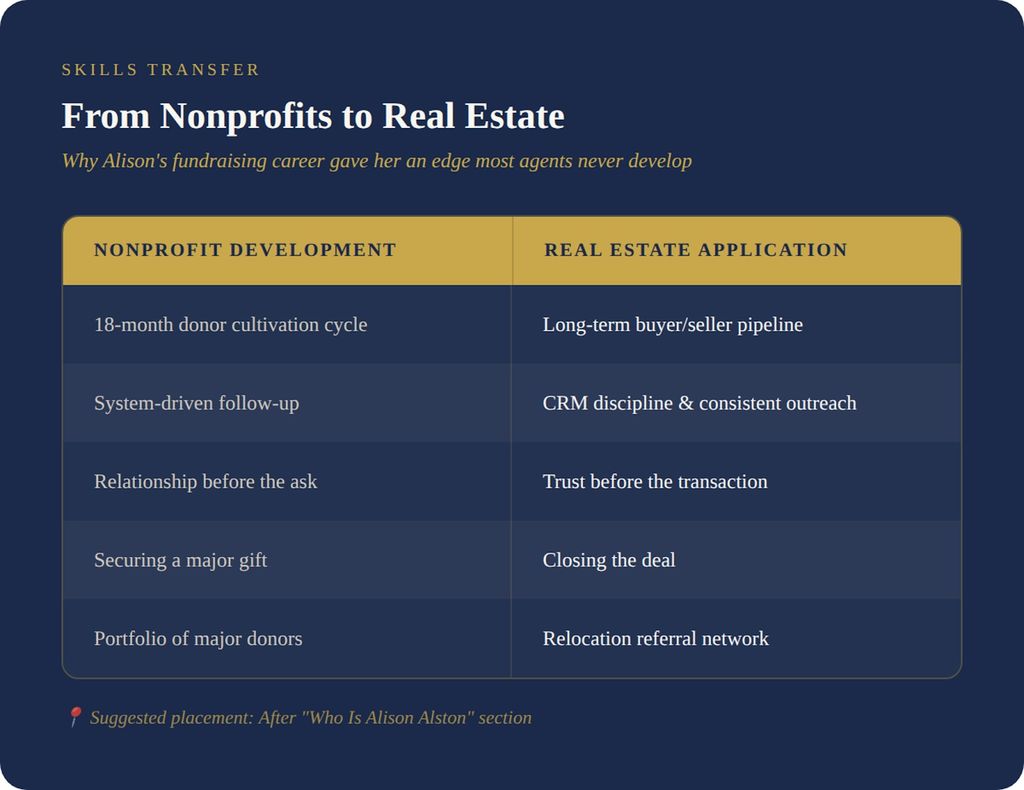
Alison Alston Lodestone Real Estate by eXp Realty in Charlotte. Before real estate, she spent years as a Director of Development in the private school sector. That meant cultivating donors for eighteen months on average before ever seeing a gift close.
“An average donation back when I was in the business was roughly 18 months from introduction to closing a major gift, 18 months. So you really need to be great at your follow-up. You have to have a system in place, and it needs to be consistent.”
Who Is Alison Alston & What Makes Her Different
Alison Alston Lodestone Real Estate by eXp Realty in Charlotte. Before real estate, she spent years as a Director of Development in the private school sector. That meant cultivating donors for eighteen months on average before ever seeing a gift close.
“An average donation back when I was in the business was roughly 18 months from introduction to closing a major gift, 18 months. So you really need to be great at your follow-up. You have to have a system in place, and it needs to be consistent.”
That nonprofit discipline translated directly into real estate. She brought that same patience to the relocation business, visiting offices monthly with cheap Pinterest gifts while earning nothing. Six months passed before she got a single bite. Then the phone started ringing.
Growing Up in Real Estate — The Foundation
Alison's real estate instincts started in childhood. Her father, a retired contractor, and her mother, an unofficial interior designer, bought properties constantly.
“My dad is a retired contractor, and my mom was the unofficial interior designer. Growing up, they would buy properties, fix them up, turn them into long-term rentals, vacation rentals, or move into them for two years and then sell them. I remember getting to a point where I hated going to open houses. And now I’m the one saying let’s go to another open house.”
That upbringing gave her a genuine understanding of construction and renovation. As she described it, she watched her parents treat properties as long-term assets rather than quick commissions. That mindset stuck.
The Power of Patience — Why Most Agents Quit Too Early
When Alison got licensed in February 2017, she did not expect overnight success.
“I would go around every single month and do a little ‘Popeye’ with some cheesy thing I got off Pinterest that was super cheap because I was making $0 then. And it took six months before I even got a bite.”
Most agents would have quit. Alison told me she kept going because she understood this business is a long game. Consistency eventually compounds. That patience built a relocation pipeline that sustained her for years.
Mentorship, Humility & Starting as a Cog in the Wheel
When Alison joined Lodestone, she made a counterintuitive request. She asked her mentor to treat her like a beginner.
“I remember saying to my mentor, ‘I just want to be a cog in the wheel. I don’t want to manage anything. You’re going to tell me exactly what to do so that I learn the fundamentals of North Carolina real estate, and I’m going to listen, and then I’m going to go do that.”
Starting a new career in her thirties meant swallowing pride. She admitted to me, "It was certainly difficult to start a brand new career in my thirties because you're used to knowing everything. So you have to have a lot of humility."
She watched a friend who started the same day close deals while she waited. Instead of spiraling, she stayed humble. For agents wondering how to find a real estate mentor, Alison's approach offers a blueprint—start as a learner, not a leader.
Agents looking for a proven framework for success would do well to emulate her willingness to start at the bottom and learn fundamentals first.
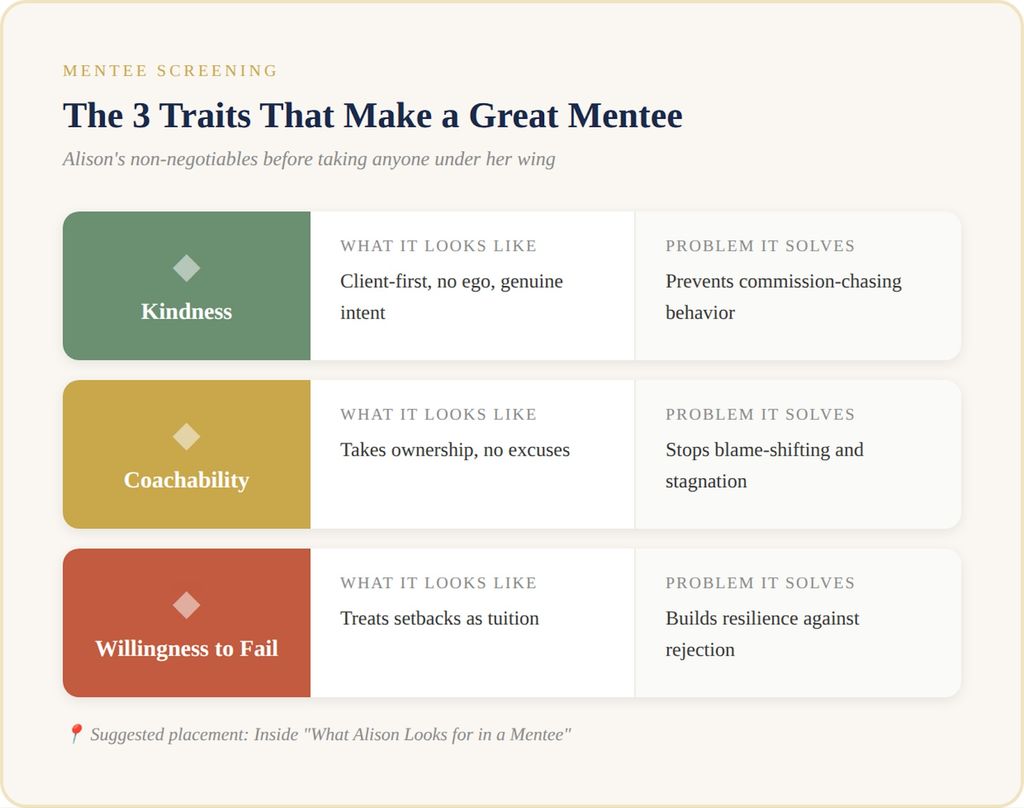
Now that Alison leads her own team, she screens potential mentees carefully. Her real estate team mentorship model focuses on three traits.
1. Kindness
“If you’re not a decent human being, I’m not going to deal with you. They’ve got to want it for the right reasons — actually putting the client first at all times, even if it means a hit to you.”
2. Coachability
“If the ‘excuse-saurus’ comes out and they tell me all the reasons why everyone else caused them to fail, I’m like, this is not going to work because you’re not coachable.”
3. Willingness to Fail
“You’re going to get kicked in the teeth a lot in this business. It’s brutal. You’ve got to be willing to fail and fail fast.”
Failure is guaranteed. She made it clear that the only question is whether agents learn from it. The agents featured in our success stories all share this trait.
The Biggest Mistakes Agents Make
1. No Systems
“They’re just flying by the seat of their pants. I call it shiny object syndrome. There’s no plan in place. They don’t have clear goals. They don’t write them down. They don’t set up systems for success.”
Shiny object syndrome in real estate kills careers. Without real estate agent systems and processes, agents chase everything and catch nothing.
The median annual wage for real estate agents was $52,030 in 2023, reflecting how few build sustainable businesses. Those earning more have systems in place, unlike those chasing trends.
2. Confusing Busy With Productive
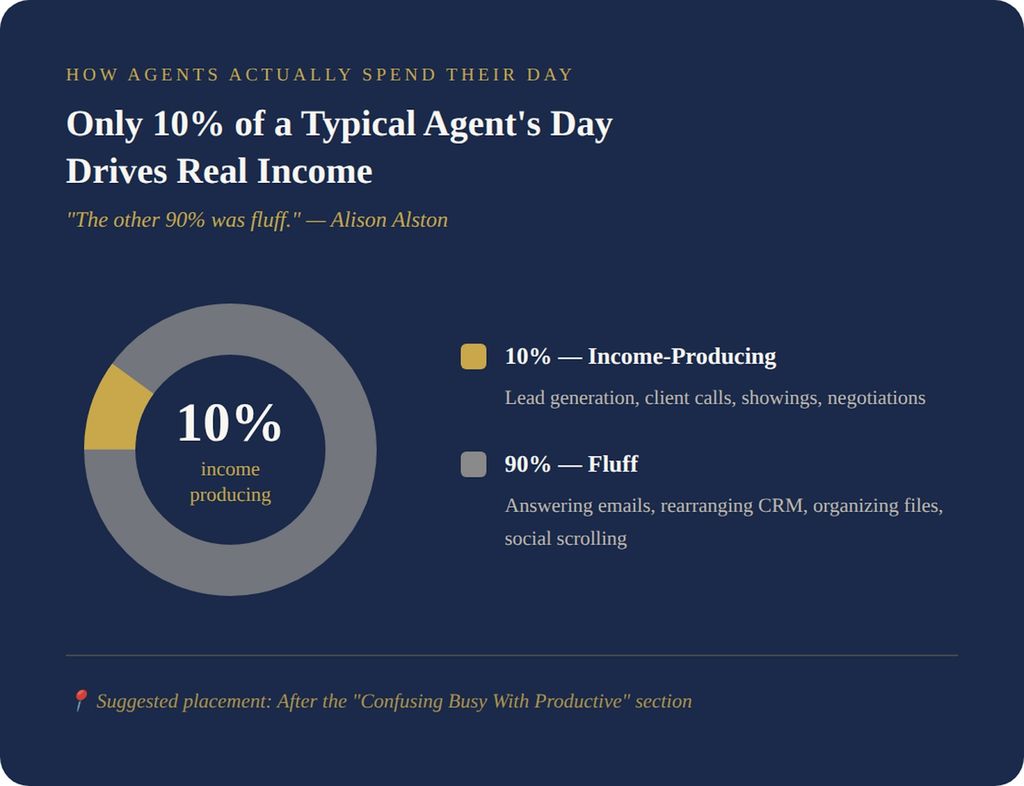
“They spent the entire day working. And then you sit down, and maybe 10% of it was actually income-producing activities. The other 90% was fluff.”
This is the classic trap of real estate agent productivity vs busy work. As Alison pointed out, answering emails and organizing files puts no money in the bank.
The 2-Hour Rule — Daily Lead Generation Discipline
“Figure out what consistent time — minimum of two hours every single day — can I spend doing lead generation? And block that out. Non-negotiable.”
This is lead generation time blocking for agents at its simplest. Most agents resist because results are not immediate. Alison explained she pushes anyway because feast-or-famine cycles destroy momentum.
Two hours daily beats ten hours once a week.
Handling the First Commission High
“I used to fight my agents on this, and now I let them spiral on the first one. Then we sit down, and I ask, what were the activities that led to that transaction? Let’s repeat those and then let’s do it on steroids.”
The lesson sticks better when agents learn it themselves. She told me she just makes sure they do not stay stuck.
Burnout — The Wake-Up Call
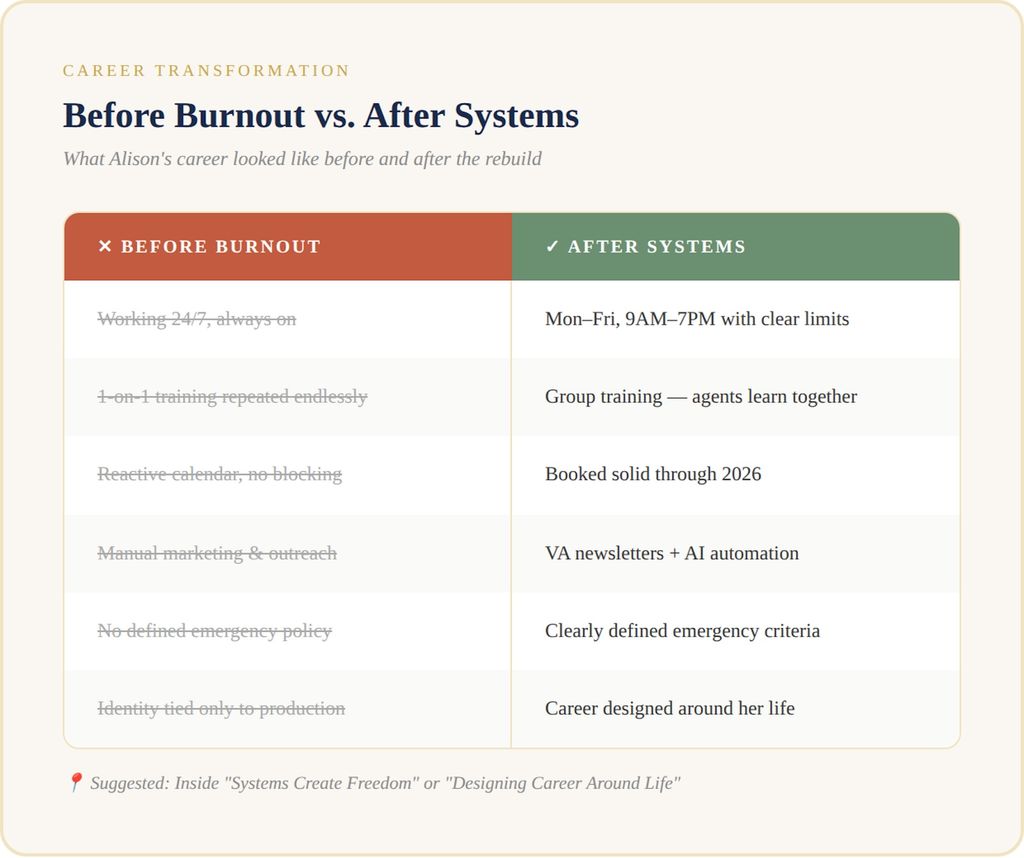
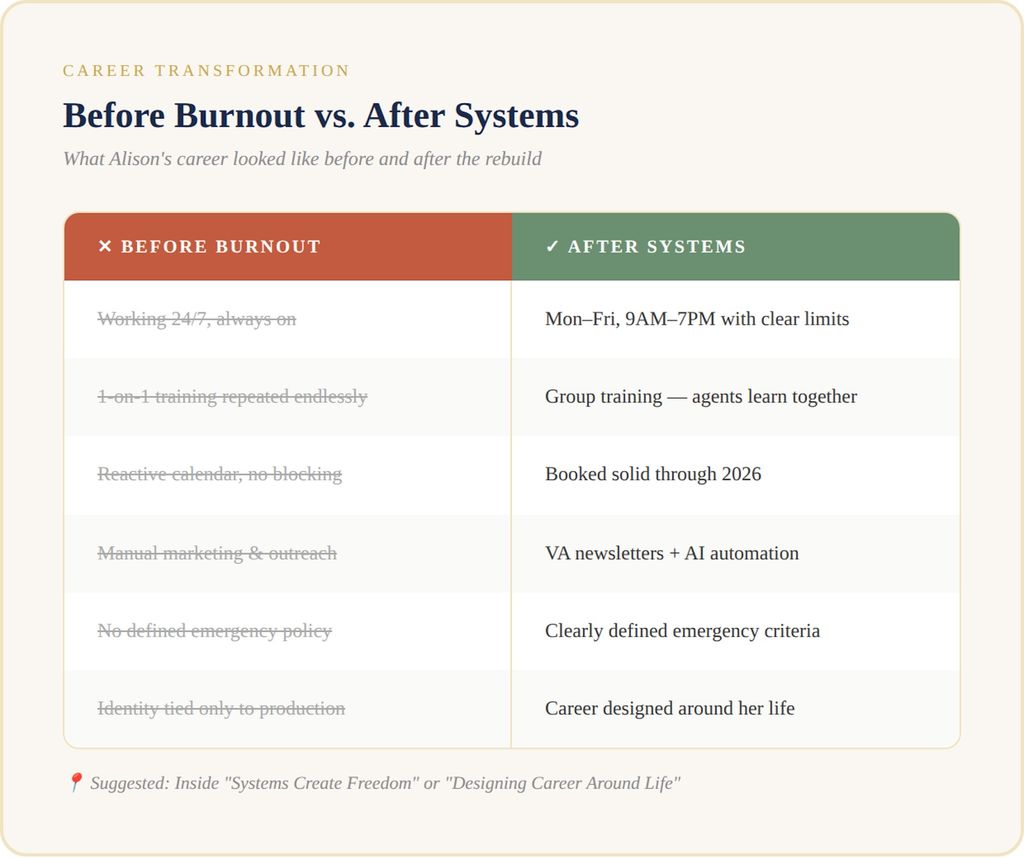
For five years, Alison worked 24/7. Always available. Always pushing.
Then her body stopped cooperating.
“I used to work 24/7 and thought I was superwoman. About five years in, I realized I could not. I got diagnosed with an autoimmune condition and took almost three months off.”
This is where understanding how to avoid burnout in real estate becomes personal. She shared with me she had to decide, "Am I going to keep going down this path and be number one, but probably kill myself getting there? Or find a way to enjoy both sides of life?"
Alison became one of thousands facing burnout as Harvard's Joint Center for Housing Studies reports that housing affordability pressures intensify. Her experience shows why real estate agent burnout prevention is critical.
Setting Real Estate Boundaries Without Losing Business
If you want to know how to set boundaries with clients, start by clearly communicating your working hours.
“My hours are Monday through Friday from 9:00 AM to 7:00 PM unless it is an emergency. And I clearly define what an emergency is.”
For listings, she reframed the conversation entirely.
“I don’t think it’s intelligent to make the largest financial decision of your life at 10 o’clock at night. We’ll review offers in the morning.”
She explained she tells sellers this upfront so they understand the reasoning behind her boundaries. Clients adapted. As Alison put it, the ones who would not adapt were probably not a good fit anyway.
She admits she has become very strict about Sundays and will not answer. "I'm gonna be honest, if it's on Sunday, I'm not answering." If a client moves on because she did not answer on the first ring, she is okay with that. She stresses to her agents that if people expect you to be available twenty-four seven, you have to decide what kind of agent you want to be.
Systems Create Freedom
During her time off, Alison rebuilt her operation. She realized one-on-one training consumed hours.
“I realized I was doing the same one-on-one lessons over and over. That’s not a great use of time. So we condensed it into group training so they can learn from each other.”
She now keeps her calendar blocked through 2026. As she told me, "We design the career around the life we want." Systems are automated with AI and do not fall apart.
Designing a Career Around Life — Not the Other Way Around
“I realized I had to love the rest of my life too. If you want to be number one but it kills you getting there, what’s the point?”
Now she takes real vacations. Two weeks in France for her tenth anniversary. Regular trips with her sister's kids, who are her why.
She delegates and automates, grateful for her supportive team that ensures everything runs smoothly. At Take Action Realty Group, we prioritize community and client support.
Alison Alston Lodestone Real Estate proves you can design your career around your life, not the other way around. If you want to hear more conversations like this, visit the real estate podcast network to explore all our episodes.
Frequently Asked Questions
Who is Alison Alston?
Alison Alston leads Lodestone Real Estate, a Charlotte NC real estate agent from the eXp Realty team. She transitioned from nonprofit development to real estate in 2017.
What is Lodestone Real Estate in Charlotte?
Lodestone Real Estate is a team powered by eXp Realty, serving the Charlotte market with an emphasis on systems and mentorship.
How long has Alison Alston been in real estate?
She started in February 2017, bringing nearly nine years of experience to her role as team leader and Charlotte real estate mentor.
What are the biggest mistakes new real estate agents make?
No systems, mistaking busy work for productivity, and abandoning lead generation after closing.
How many hours per day should agents spend on lead generation?
Two hours daily, blocked as non-negotiable.
How do you prevent burnout as a real estate agent?
Set clear hours, delegate non-income tasks, and schedule personal time first.
What traits make a good real estate mentee?
Kindness, coachability, and willingness to fail.
How do systems improve real estate productivity?
Systems eliminate decision fatigue and ensure consistency.
Should real estate agents work seven days a week?
Alison does not. She protects Sundays completely.
How do you set boundaries with clients?
Communicate hours upfront and explain why after-hours decisions harm clients.
Apply to Be a Guest on the Why Do I Suck as a Real Estate Agent Podcast
Real estate is evolving. Markets are tightening. Capital is shifting. If you are actively working in the industry and solving real problems — whether in brokerage, construction, finance, or development — we would love to hear your story. Visit our Icons hub to learn more.
An investor-friendly real estate agent is someone who understands numbers, risk, and strategy, not just contracts and comps. Investors do not need another salesperson. They…
This mode enables people with epilepsy to use the website safely by eliminating the risk of seizures that result from flashing or blinking animations and risky color combinations.
Visually Impaired Mode
Improves website's visuals
This mode adjusts the website for the convenience of users with visual impairments such as Degrading Eyesight, Tunnel Vision, Cataract, Glaucoma, and others.
Cognitive Disability Mode
Helps to focus on specific content
This mode provides different assistive options to help users with cognitive impairments such as Dyslexia, Autism, CVA, and others, to focus on the essential elements of the website more easily.
ADHD Friendly Mode
Reduces distractions and improve focus
This mode helps users with ADHD and Neurodevelopmental disorders to read, browse, and focus on the main website elements more easily while significantly reducing distractions.
Blindness Mode
Allows using the site with your screen-reader
This mode configures the website to be compatible with screen-readers such as JAWS, NVDA, VoiceOver, and TalkBack. A screen-reader is software for blind users that is installed on a computer and smartphone, and websites must be compatible with it.
Online Dictionary
Readable Experience
Content Scaling
Default
Text Magnifier
Readable Font
Dyslexia Friendly
Highlight Titles
Highlight Links
Font Sizing
Default
Line Height
Default
Letter Spacing
Default
Left Aligned
Center Aligned
Right Aligned
Visually Pleasing Experience
Dark Contrast
Light Contrast
Monochrome
High Contrast
High Saturation
Low Saturation
Adjust Text Colors
Adjust Title Colors
Adjust Background Colors
Easy Orientation
Mute Sounds
Hide Images
Virtual Keyboard
Reading Guide
Stop Animations
Reading Mask
Highlight Hover
Highlight Focus
Big Black Cursor
Big White Cursor
Text to Speech
Navigation Keys
Accessibility Statement
tarealtygroup.com
August 9, 2026
Compliance status
We firmly believe that the internet should be available and accessible to anyone, and are committed to providing a website that is accessible to the widest possible audience,
regardless of circumstance and ability.
To fulfill this, we aim to adhere as strictly as possible to the World Wide Web Consortium’s (W3C) Web Content Accessibility Guidelines 2.1 (WCAG 2.1) at the AA level.
These guidelines explain how to make web content accessible to people with a wide array of disabilities. Complying with those guidelines helps us ensure that the website is accessible
to all people: blind people, people with motor impairments, visual impairment, cognitive disabilities, and more.
This website utilizes various technologies that are meant to make it as accessible as possible at all times. We utilize an accessibility interface that allows persons with specific
disabilities to adjust the website’s UI (user interface) and design it to their personal needs.
Additionally, the website utilizes an AI-based application that runs in the background and optimizes its accessibility level constantly. This application remediates the website’s HTML,
adapts Its functionality and behavior for screen-readers used by the blind users, and for keyboard functions used by individuals with motor impairments.
If you’ve found a malfunction or have ideas for improvement, we’ll be happy to hear from you. You can reach out to the website’s operators by using the following email [email protected]
Screen-reader and keyboard navigation
Our website implements the ARIA attributes (Accessible Rich Internet Applications) technique, alongside various different behavioral changes, to ensure blind users visiting with
screen-readers are able to read, comprehend, and enjoy the website’s functions. As soon as a user with a screen-reader enters your site, they immediately receive
a prompt to enter the Screen-Reader Profile so they can browse and operate your site effectively. Here’s how our website covers some of the most important screen-reader requirements,
alongside console screenshots of code examples:
Screen-reader optimization: we run a background process that learns the website’s components from top to bottom, to ensure ongoing compliance even when updating the website.
In this process, we provide screen-readers with meaningful data using the ARIA set of attributes. For example, we provide accurate form labels;
descriptions for actionable icons (social media icons, search icons, cart icons, etc.); validation guidance for form inputs; element roles such as buttons, menus, modal dialogues (popups),
and others. Additionally, the background process scans all of the website’s images and provides an accurate and meaningful image-object-recognition-based description as an ALT (alternate text) tag
for images that are not described. It will also extract texts that are embedded within the image, using an OCR (optical character recognition) technology.
To turn on screen-reader adjustments at any time, users need only to press the Alt+1 keyboard combination. Screen-reader users also get automatic announcements to turn the Screen-reader mode on
as soon as they enter the website.These adjustments are compatible with all popular screen readers, including JAWS and NVDA.
Keyboard navigation optimization: The background process also adjusts the website’s HTML, and adds various behaviors using JavaScript code to make the website operable by the keyboard. This includes the ability to navigate the website using the Tab and Shift+Tab keys, operate dropdowns with the arrow keys, close them with Esc, trigger buttons and links using the Enter key, navigate between radio and checkbox elements using the arrow keys, and fill them in with the Spacebar or Enter key.Additionally, keyboard users will find quick-navigation and content-skip menus, available at any time by clicking Alt+1, or as the first elements of the site while navigating with the keyboard. The background process also handles triggered popups by moving the keyboard focus towards them as soon as they appear, and not allow the focus drift outside of it.Users can also use shortcuts such as “M” (menus), “H” (headings), “F” (forms), “B” (buttons), and “G” (graphics) to jump to specific elements.
Disability profiles supported in our website
Epilepsy Safe Mode: this profile enables people with epilepsy to use the website safely by eliminating the risk of seizures that result from flashing or blinking animations and risky color combinations.
Visually Impaired Mode: this mode adjusts the website for the convenience of users with visual impairments such as Degrading Eyesight, Tunnel Vision, Cataract, Glaucoma, and others.
Cognitive Disability Mode: this mode provides different assistive options to help users with cognitive impairments such as Dyslexia, Autism, CVA, and others, to focus on the essential elements of the website more easily.
ADHD Friendly Mode: this mode helps users with ADHD and Neurodevelopmental disorders to read, browse, and focus on the main website elements more easily while significantly reducing distractions.
Blindness Mode: this mode configures the website to be compatible with screen-readers such as JAWS, NVDA, VoiceOver, and TalkBack. A screen-reader is software for blind users that is installed on a computer and smartphone, and websites must be compatible with it.
Keyboard Navigation Profile (Motor-Impaired): this profile enables motor-impaired persons to operate the website using the keyboard Tab, Shift+Tab, and the Enter keys. Users can also use shortcuts such as “M” (menus), “H” (headings), “F” (forms), “B” (buttons), and “G” (graphics) to jump to specific elements.
Additional UI, design, and readability adjustments
Font adjustments – users, can increase and decrease its size, change its family (type), adjust the spacing, alignment, line height, and more.
Color adjustments – users can select various color contrast profiles such as light, dark, inverted, and monochrome. Additionally, users can swap color schemes of titles, texts, and backgrounds, with over 7 different coloring options.
Animations – epileptic users can stop all running animations with the click of a button. Animations controlled by the interface include videos, GIFs, and CSS flashing transitions.
Content highlighting – users can choose to emphasize important elements such as links and titles. They can also choose to highlight focused or hovered elements only.
Audio muting – users with hearing devices may experience headaches or other issues due to automatic audio playing. This option lets users mute the entire website instantly.
Cognitive disorders – we utilize a search engine that is linked to Wikipedia and Wiktionary, allowing people with cognitive disorders to decipher meanings of phrases, initials, slang, and others.
Additional functions – we provide users the option to change cursor color and size, use a printing mode, enable a virtual keyboard, and many other functions.
Browser and assistive technology compatibility
We aim to support the widest array of browsers and assistive technologies as possible, so our users can choose the best fitting tools for them, with as few limitations as possible. Therefore, we have worked very hard to be able to support all major systems that comprise over 95% of the user market share including Google Chrome, Mozilla Firefox, Apple Safari, Opera and Microsoft Edge, JAWS and NVDA (screen readers), both for Windows and for MAC users.
Notes, comments, and feedback
Despite our very best efforts to allow anybody to adjust the website to their needs, there may still be pages or sections that are not fully accessible, are in the process of becoming accessible, or are lacking an adequate technological solution to make them accessible. Still, we are continually improving our accessibility, adding, updating and improving its options and features, and developing and adopting new technologies. All this is meant to reach the optimal level of accessibility, following technological advancements. For any assistance, please reach out to [email protected]